How to connect SearchGrowAI to your Shopify store?
Follow the steps below to successfully connect your Shopify store to SearchGrowAI:
1. Get Your Shopify Admin API Token
Open your Shopify Admin panel (like: admin.shopify.com/store/xxxxxxxxxxx), scroll down and click Apps, then on top right click Develop apps. Then Allow cutsom app development.
Click "Create an app" and give it a name.
Go to the API credentials tab ➔ under Access tokens click "Configure Admin API scopes", and select:
read_contentwrite_content
Then click "Save" and "Install app" to get your Admin API token.
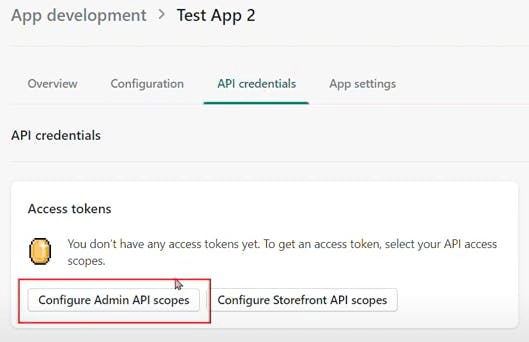
2. Fill Out the SearchGrowAI Shopify Connection Form
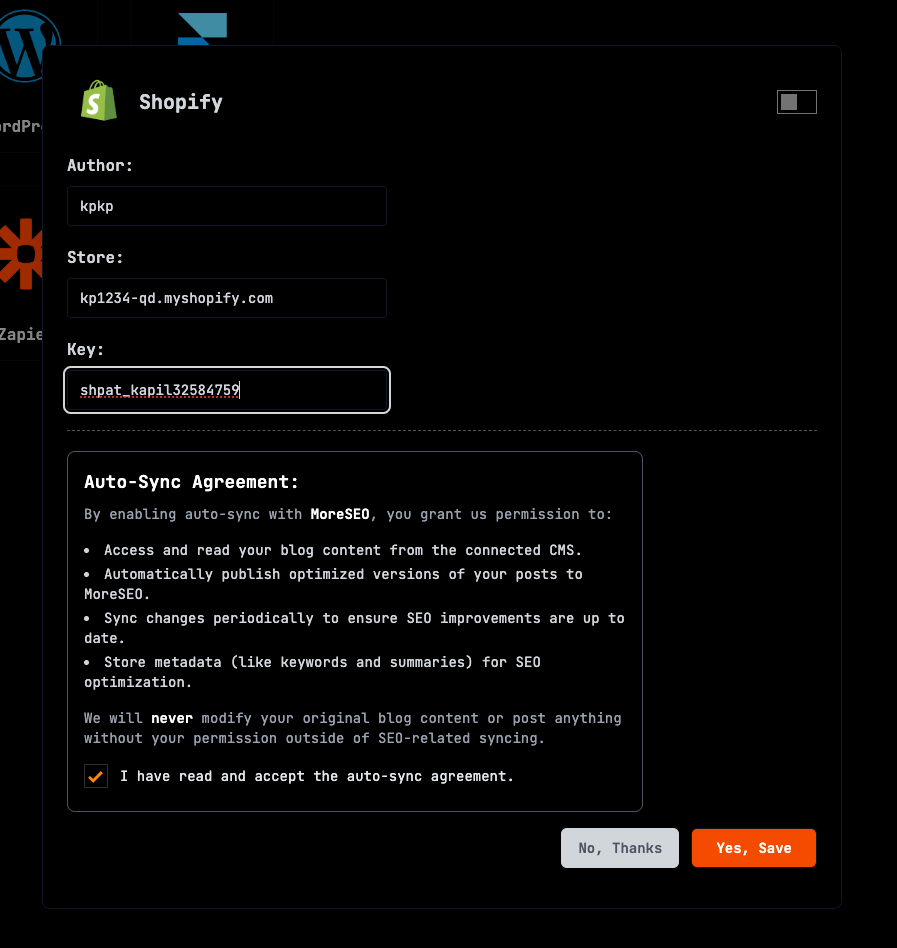
1. Go to the CMS section from the sidebar ➔ select Shopify from the CMS list.
2. Enter your Author Name, Shopify Store ID, and Secret in the provided input fields.
3. Hit Save — you are all set! You can also check the article data structure guide.
4. Don't forget to toggle the switch to Enable Connection!